CodeRun AI Agent Documentation
The comprehensive developer reference manual and architecture specification for CodeRun AI Agent (AI-AGENT) — Visual Studio Code's multi-provider autonomous software engineer.

🧠 Architecture & The Agentic Loop
CodeRun operates on a rigorous multi-step cognitive pipeline: Think → Plan → Act → Verify. Rather than streaming text directly into your editor, CodeRun acts as an autonomous agent reasoning over project context, proposing structured tool actions, enforcing permission safety boundaries, and verifying changes on disk.
Decomposed Modular Engine Runtime
To prevent monolithic failure modes and isolate operational blast radius, the agent runtime decomposes responsibilities into dedicated single-purpose engines behind stable interfaces:
🏛️ 3-Tier Modular Architecture
CodeRun strictly enforces the 3-Tier Modular Pattern (Controller → Handler → Manager) with complete physical and logical separation between the Backend Extension Host (src/extension/) and Frontend Webview (src/UI/):
UI-controller.js (backend) & host-controller.js (frontend) listen to IPC events (onDidReceiveMessage, window.addEventListener("message")) and immediately delegate to handlers. Zero business logic resides in controllers.
src/extension/manager/*handler.js & src/UI/chats/chats-*-manager.js parse, validate, and coordinate incoming request payloads, invoke manager functions, and dispatch structured response messages back over the IPC channel.
tools.js (36 tools), agentLoop.js, projectKnowledge.js (SQLite AST indexing via SQL.js), checkpointManager.js, diffManager.js, and terminalManager.js implement pure business logic, state mutations, and storage.
D:\cline-ollama/
├── icons/                            ← Brand, logo, and avatar media assets
├── src/
│   ├── extension/                    ← 100% Backend Extension Host Logic
│   │   ├── main/                     ← Extension lifecycle & activation (extension.js, html-manager.js)
│   │   ├── controller/               ← Pure message router (UI-controller.js)
│   │   ├── manager/                  ← Domain request handlers (chatshandler.js, diffshandler.js, etc.)
│   │   ├── browser/                  ← Browser automation provider & session manager (providerQwen.js, qwenSessionManager.js)
│   │   ├── permission-manager/       ← Unified permission storage (permission-store.js)
│   │   ├── agents/                   ← Core agent loop, state machine & subagents
│   │   ├── context/                  ← Context engine & SQLite knowledge base (index.db via SQL.js)
│   │   ├── execution/                ← Diagnostics, review, verification & trace engines
│   │   ├── mcp/                      ← MCP clients & Python virtualenv manager
│   │   ├── media/                    ← Media extraction, formatting & disk persistence
│   │   ├── providers/                ← 9 native LLM providers & model classifier
│   │   └── tools/                    ← 36 async tool implementations & security guards
│   │
│   └── UI/                           ← 100% Frontend Webview DOM & Styling
│       ├── index.html                ← Single entry point loading dashboard/dashboard.js
│       ├── controller/               ← Pure Webview message routing (host-controller.js, vscode-api.js)
│       ├── dashboard/                ← Shell layout, header status, navigation & logo
│       ├── chats/                    ← Chat rendering, timeline, diffs, checkpoints & subagents
│       ├── browser/                  ← Browser automation UI components (auth manager, badge, cards)
│       ├── permission-manager/       ← Reusable permission prompt dialogs (permission-card.js)
│       └── settings/                 ← Provider, model, MCP, rules & trace panels
🏛️ Architecture and Features
Key architectural design decisions, technical capabilities, and built-in subsystems powering CodeRun AI Agent:
| Feature / Capability | Architectural Design | Implementation & Highlights |
|---|---|---|
| Modular Engine Decomposition | Decoupled runtime across 7 specialized engines (Context, Delegation, Tool Execution, Media, Decision, ContextBuilder, StateMachine) | ✅ High Reliability Failure blast radius containment; agentLoop reduced by 50% to a pure coordinator |
| Multi-Provider Engine | Modular provider adapters in src/extension/providers/ & src/extension/browser/ with unified streaming & normalization |
9 Providers (Ollama, Gemini, Claude, OpenAI, Groq, OpenRouter, xAI, Qwen, Custom) |
| Qwen Browser Automation | Native browser provider in src/extension/browser/providerQwen.js with per-chat session isolation |
✅ Isolated Sessions Zero URL leakage, streaming SSE thoughts & Wanx image synthesis |
| 100% Free & Offline (Ollama) | Native Ollama streaming adapter with dynamic model context length discovery | ✅ Native Full streaming, vision, zero data leaves local machine |
| Isolated User Sandbox | Dedicated sandbox directory (~/.coderun/sandbox/) with transparent CWD synchronization |
✅ Native Safe scratchpad execution without polluting workspace git repo |
| On-Install Browser Automation | Embedded browser discovery in src/extension/mcp/mcpManager.js + Puppeteer MCP server |
✅ Automatic Auto-locates Chrome/Edge/Brave or installs Chromium |
| Persistent Memory Graph MCP | Built-in stdio-based knowledge graph server (memoryGraphServer.cjs) |
✅ Built-in Pre-configured 1-click catalog for cross-session facts & relations |
| Deterministic Context Compaction | Pure local 0ms checkpoint generator in src/extension/context/compactionManager.js |
✅ 0ms Instant Local chronological summaries, 0 external API cost |
| Historical Tool Compaction | Wire-protocol optimizer in src/extension/context/contextManager.js |
✅ Automatic Compact old turns up to 90%, preserve failures & mutation diffs |
| Local SQLite Codebase Index | Embedded SQL.js database (src/extension/context/projectKnowledge.js) with serialized disk writes |
✅ Embedded SQL.js Fast symbol & file indexing, 0 cloud leakage |
| Interactive Terminal REPLs | VS Code Terminal API bridge with shell integration & prompt detection (terminalManager.js) |
✅ Full Lifecycle Interactive stdin keystrokes & prompts, clean Ctrl+C interrupt |
| Dynamic Card Error Containment | Dynamic card sizing with CSS auto-wrapping (overflow-wrap: anywhere) |
✅ Auto-wrapping Top-pinned icon, no boundary spill on long URLs/JSON |
| Live Monotonic Token Tracking | Real-time context window gauge with model limit store (modelContextWindows) |
✅ Real-time Gauge Dynamic warnings at 70% and 90% threshold saturation |
| Interactive User Questions | Session-isolated question lifecycle manager (src/extension/tools/questionManager.js) |
✅ ask_question Interactive option chips + custom write-in directly in chat |
| Message Copy Buttons & Fidelity | Raw markdown & input text extraction with clipboard fallback in src/UI/chats/chats.js |
✅ Full Fidelity Prompt & assistant response copy with ending timestamps and zero UI noise |
| Native VS Code LSP & Diagnostics | Language Server Protocol integration in src/extension/tools/tools.js & src/extension/execution/reviewEngine.js |
✅ Native LSP Live definition, reference & symbol discovery + compiler diagnostic self-healing |
| Zero-Latency Reasoning & UI State | Synchronous thinking stream & persistent user toggles in src/UI/chats/chats.js |
✅ Instant auto-scroll Direct reasoning token rendering + dropdown retention across agent loops |
| Autonomous Subagent Workers | Hierarchical subagent runner in src/extension/agents/subagentManager.js with dedicated tools |
✅ Dual-Mode Background (sync) & Synchronous (wait) delegation with undo reflection |
| Adversarial Regression Test Suite | Standalone test harness (test/runAllTests.js) with zero external test dependencies |
✅ 88 Test Groups Comprehensive regression suite for reliability |
📦 Installation & Quick Setup Guide
Get CodeRun AI Agent (AI-AGENT) up and running in Visual Studio Code in less than two minutes. CodeRun runs either 100% locally and privately on your machine using Ollama or LM Studio, or connects seamlessly to your preferred cloud model provider (Google Gemini, Anthropic Claude, OpenAI, Groq, OpenRouter, and more).
• Windows 10/11, macOS (Apple Silicon / Intel), or Linux (x64/arm64)
• Git installed and available in your terminal PATH
Step 1: Install the VS Code Extension
Choose your preferred installation method below:
1. Open VS Code and press Ctrl+Shift+X (or Cmd+Shift+X on macOS) to open the Extensions view.
2. In the search box, type AI-AGENT or Bala-Siva-Ganesh.ai-agent.
3. Click Install on the CodeRun AI Agent extension.
Run this command in any terminal (PowerShell, Bash, or Command Prompt) to install directly:
code --install-extension Bala-Siva-Ganesh.ai-agentIf you downloaded a packaged .vsix release file from GitHub Releases or local builds:
code --install-extension coderun-agent-1.7.4.vsixOr in VS Code: open the Extensions view → click the ··· (More Actions) menu → select Install from VSIX....
Step 2: Choose Your AI Backend
CodeRun works seamlessly with both completely private local models and high-performance cloud APIs:
2. Pull any coding model of your choice:
ollama run qwen2.5-coder:7bdeepseek-r1:8b, llama3.2:3b, codellama:7b. Ollama runs at http://localhost:11434 automatically without any API key!
- Google Gemini: Google AI Studio (Generous free tier)
- Anthropic: Anthropic Console (Claude 3.5 Sonnet)
- Groq: Groq Cloud (Ultra-fast Llama 3)
- OpenAI / DeepSeek / OpenRouter: Compatible endpoints
Step 3: Launch CodeRun & First Prompt
Click the CodeRun Robot icon in your VS Code Activity Bar on the left. Or press Ctrl+Shift+P and run CodeRun: Focus on Chat View.
In the top dropdown, select your configured provider (e.g., Ollama → qwen2.5-coder:7b, or Gemini → gemini-2.0-flash).
Type a prompt such as: "Analyze this workspace, explain the architecture, and run the test suite" and watch CodeRun think, plan, and execute!
🤖 Supported Providers
CodeRun supports 9 native provider backends. Each backend communicates natively with its respective protocol and leverages vision capabilities, system prompt structures, and function calling mechanisms:
| Provider | Protocol | Default Base URL | Key Required? | Vision Support |
|---|---|---|---|---|
| Ollama | Ollama Native REST | http://localhost:11434 |
No | ✅ images Base64 Array |
| Google Gemini | REST v1beta & OpenAI | https://generativelanguage.googleapis.com/v1beta |
Yes | ✅ inline_data Parts |
| Anthropic Claude | Messages API v1 | https://api.anthropic.com/v1 |
Yes | ✅ image Source Blocks |
| OpenAI | Chat Completions v1 | https://api.openai.com/v1 |
Yes | ✅ image_url Objects |
| Groq | OpenAI Compatible | https://api.groq.com/openai/v1 |
Yes | ✅ Vision models supported |
| OpenRouter | OpenAI Compatible | https://openrouter.ai/api/v1 |
Yes | ✅ 200+ Multi-Modal Models |
| xAI (Grok) | OpenAI Compatible | https://api.x.ai/v1 |
Yes | ✅ grok-2-vision |
| Compatible Endpoints | Custom API Selection | Custom URL (LM Studio, vLLM, Cloudflare) | Optional | ✅ Multi-modal routing |
| Qwen (Browser Automation) | Browser Automation Session | N/A (Browser Session) |
Session Cookie / Token | ✅ Media / OSS Upload |
🌐 Qwen Browser Automation Provider
CodeRun features an integrated browser automation adapter (src/extension/browser/providerQwen.js) that bridges Visual Studio Code directly into Qwen's conversational intelligence through authenticated browser sessions. This provides developers access to reasoning and vision models without requiring static API keys or external proxy endpoints.
🧩 Abstracted Backend Service Architecture
The browser provider coordinates communication through clean conceptual service abstractions without exposing or relying on hardcoded API URLs:
| Service Interface | Functional Role | Integration Highlights |
|---|---|---|
| Models API | Model Discovery & Catalog | Dynamically enumerates available Qwen reasoning and chat models into the top model selector dropdown. |
| New Chat API | Session Provisioning | Provisions a fresh, isolated session ID for each newly initiated chat tab in VS Code. |
| Chat Completions API | Streaming SSE Pipe | Full Server-Sent Events (SSE) streaming yielding real-time thinking tokens, text increments, and function calls. |
| Image Generation API (Wanx) | Visual Asset Synthesis | Native text-to-image synthesis pipeline with automatic task status polling and local asset persistence in VS Code storage. |
| Media / OSS Upload API | Multi-Modal Asset Gateway | Uploads images and workspace media attached to user prompts for vision model analysis. |
| Chat Deletion API | Resource Lifecycle Cleanup | Gracefully terminates and purges remote session state when a conversation is reset, cleared, or deleted. |
📐 Strict Output Format & Tool Contracts
To maintain strict compatibility across all 88 test vectors and ensure smooth UI rendering without glitches:
- OpenAI Format Normalization: The provider normalizes responses into standard OpenAI-compliant function call schemas directly inside
providerQwen.jsbefore yielding to the agent loop. - Buffered Single Tool Emission: Reasoning thoughts stream smoothly into the UI thinking container, while tool invocations are buffered and emitted as complete individual units to prevent partial JSON rendering glitches.
- Native Image Generation & Streaming: When image generation is requested, Qwen synthesizes the image directly server-side and streams the CDN image URL as rich markdown into the chat. This terminates cleanly on Turn 1 with zero redundant workspace tool loop overhead. If a tool call is emitted without prior streaming, CodeRun's provider adapter intercepts it, resolves the asset, and returns the markdown image directly.
- Stateless Context Parity: Conversational context is dynamically assembled and dispatched per turn by the agent loop, maintaining complete parity with standard API providers and avoiding reliance on browser-side memory.
⚙️ Setup & Configuration
Configuring the Qwen Browser Automation Provider in CodeRun takes only a few seconds:
- Open the CodeRun Settings panel (⚙) on the left sidebar navigation rail.
- Select Qwen (Browser Automation) from the Provider dropdown.
- Enter your active browser session cookie or token into the session credentials field and click Save Settings (credentials are securely preserved in local storage).
- Click the 🔄 (Refresh Models) icon in the chat model selector to dynamically discover available models (e.g.
qwen3.8-max,qwen3.7-plus,qwen3.6-plus). - Select your model and start coding, asking questions, or generating visual assets with real-time reasoning streaming.
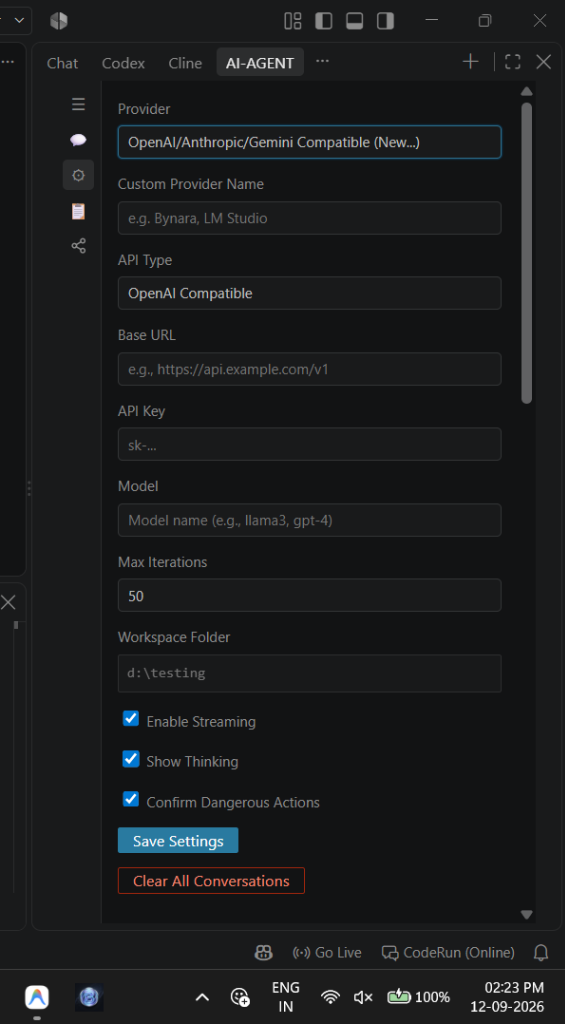
💾 How to Save Providers: Step-by-Step Guide
CodeRun allows you to save credentials and endpoints for multiple providers simultaneously. You do not need to re-enter your API keys or base URLs when switching between local and cloud models.
Click the ⚙ Settings icon on the left navigation rail inside the CodeRun sidebar view.
In the Provider dropdown, select the service you want to configure (e.g. Google Gemini, Anthropic, OpenAI, Ollama, or OpenAI Compatible).
When selecting OpenAI Compatible, two special fields appear:
- Custom Provider Name: Enter a friendly nickname (e.g.
Cloudflare Workers,LM Studio,vLLM Local). - API Type: Select the underlying API flavor:
OpenAI Compatible— Standard/chat/completionsformat.Anthropic Compatible— Formats headers withx-api-keyandanthropic-version.Google Gemini Compatible— Formats Google Protobuf contents structure.
Paste your endpoint URL into Base URL (e.g. https://api.openai.com/v1 or http://localhost:11434). Enter your secret token in API Key (stored securely in VS Code SecretStorage).
Click the ↻ (Refresh Models) icon to dynamically poll available models, or manually type your model ID (e.g. gemini-2.0-flash, claude-3-7-sonnet, qwen2.5-coder).
Click the prominent Save Settings button. The button briefly turns green with ✓ Saved!, confirming persistent storage.
🔄 How Saved Providers Reflect in CodeRun
Once saved, CodeRun immediately binds the configuration across the entire extension lifecycle:
🔑 icon indicating a stored key, the truncated endpoint URL, a Load button, and a remove ✕ button.gemini-2.0-flash [Google Gemini]).🛡️ Google Gemini Schema Sanitization
Google Gemini's Protobuf schema parser rejects complex JSON Schema attributes that standard OpenAI models permit. When using Gemini (via Google's REST API or OpenAI-compatible gateway), CodeRun automatically runs a deep recursive schema filter:
// Recursively strips attributes that cause Gemini HTTP 400 Bad Request
function sanitizeGeminiSchema(schema) {
  // Prunes: additionalProperties, $schema, title, $defs, definitions
  // Normalizes model strings: models/gemini-2.0-flash -> gemini-2.0-flash
}additionalProperties: false and $defs) immediately crash Gemini with HTTP 400. CodeRun's automatic sanitization ensures 100% plug-and-play compatibility.
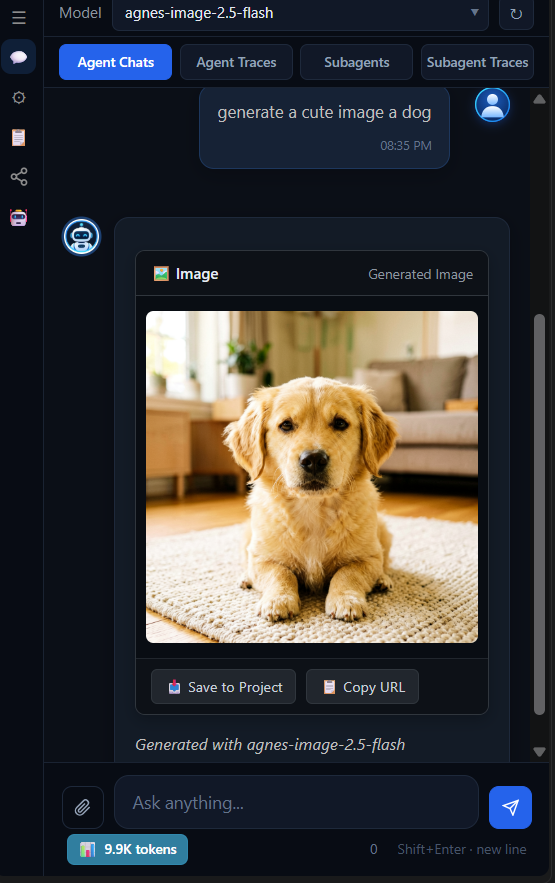
🎨 Universal Media Generation, Native HTML5 Player & Storage Isolation
Specialized multimodal generative models (such as dall-e-3, imagen-3, flux, sdxl, sora, kling, runway, minimax, or compatible video/image proxies like agnes-image-2.5-flash and agnes-video-2.5-flash) cannot process chat completion payloads sent to /v1/chat/completions.
CodeRun provides an end-to-end, provider-agnostic media pipeline featuring automated modality classification, adaptive parameter self-healing, native zero-dependency HTML5 playback, isolated persistent storage, and differentiated request timeouts:
type, modalities, architecture.modality, task).Strategy 2 (Token Heuristics): Automatic token heuristics identify image/video keywords in model IDs without manual configuration.
0:05 / 0:30), Mute (🔊/🔇), and Fullscreen (⛶).
globalStorageUri/media/ folder for session history. Assets are never auto-saved to your project workspace. Clicking 📥 Save to Project exports directly to <workspace>/assets/.
{ model, prompt } and automatically retries with mode: 'text' if an endpoint requires it. Detects asynchronous task IDs (task_id, video_id, id) and polls until completion with automatic 503 video_queue_full backoff retries.
Remote Cloud Providers: 30-Second Timeout (30,000 ms) for fast network failure detection.
// Dynamic timeout: 10 minutes for local LLMs, 30 seconds for remote cloud
var timeoutMs = isLocalEndpoint(config) ? 600000 : 30000;

// Universal video generation with adaptive retry & async polling
var vidResult = await provider.videos(config, prompt);
// Persisted strictly in globalStorage (never pollutes workspace)
var saved = await mediaManager.saveMediaFromDataOrUrl(null, sessionId, vidResult, 'mp4');
🔌 Model Context Protocol (MCP) Integration
The Model Context Protocol (MCP) is an open specification enabling AI models to safely access external data sources and execution runtimes. CodeRun provides a full stdio and SSE/HTTP client, allowing the agent to dynamically discover tools, read schemas, and invoke functions in real-time.
In CodeRun v1.7.4, Python and Node.js are treated as first-class execution runtimes rather than single static templates. When adding or editing any MCP server (GitHub, PostgreSQL, MySQL, Web Fetch, Memory, or Custom), you can freely toggle between Node.js and Python environments:
- Node.js (npx / node): Spawns MCP packages directly via
npx -y <package>or local scripts vianode script.js. - Python (uvx / python): Spawns isolated tools via
uvx <package>or local modules viapython -u -m <module>with automaticPYTHONUNBUFFERED=1stdio flushing. - Actionable Missing Module Guidance: If a Python package is not found, CodeRun immediately detects the missing module in stderr and displays an exact, copy-pasteable pip install command in the modal.
⚡ Core Agent Built-in Tools
Built-in (36 active)
Filesystem, Search, Terminal, Planning, Interaction, Utility, Sandbox, Database, Subagent, Media
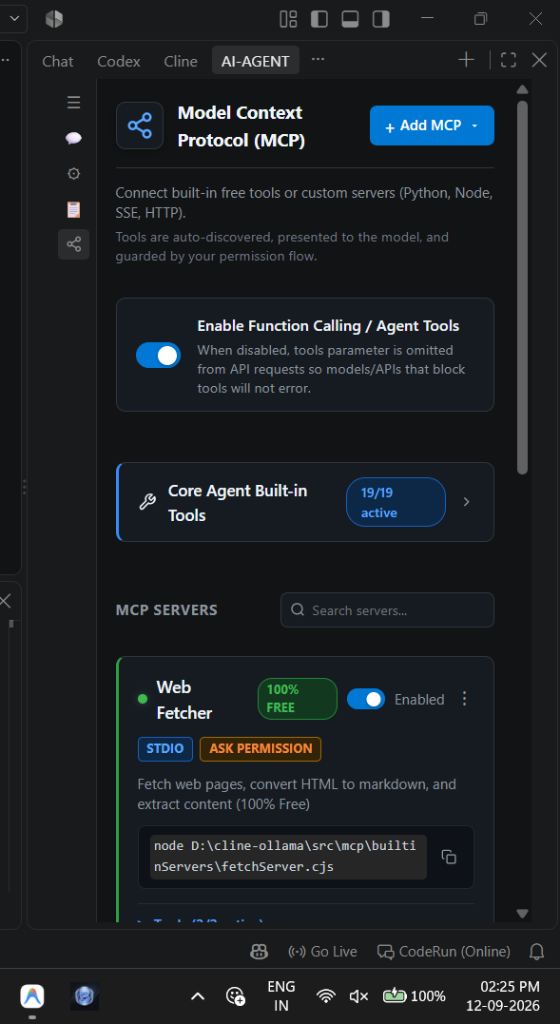
⚙️ How to Add & Save Custom MCP Servers
You can attach any community or custom MCP server directly in the CodeRun interface:
Click the MCP icon in the navigation rail (below the Rules icon).
Click the + Add MCP button at the top right to open the configuration modal.
Choose from popular pre-built templates (GitHub, Web Fetch, Memory, PostgreSQL, MySQL, or Custom) to pre-fill standard arguments.
| Field | Description | Example |
|---|---|---|
| Server Name | Unique identifier for the server | github, puppeteer, postgres-db |
| Transport Type | Local Command (stdio) or Remote Server (SSE) | Local Command |
| Runtime Environment | Execution engine for local command | Node.js (npx / node) or Python (uvx / python) |
| Command | Executable command on your system | npx, node, python, uvx |
| Arguments | Flags and package name | -y @modelcontextprotocol/server-github |
| Environment Variables | Custom tokens, API keys, or connection strings | GITHUB_PERSONAL_ACCESS_TOKEN = ghp_... |
| Working Directory | Optional working directory | C:/projects/my-mcp-server |
| Always Ask Permission | Safety approval prompt toggle | Checked (Recommended) |
Add MCP Server
Connect an MCP server to extend your agent with external tools.
Click the prominent Connect & Save button. CodeRun starts the server process, performs the JSON-RPC protocol handshake, queries tools/list, and activates the discovered tools inside your active agent session.
🔍 How MCP Reflects in Execution
Once an MCP server connects, CodeRun dynamically integrates its capabilities:
- Connection Status Indicator: The server card shows a bright green dot (
Connected) and a pill badge indicating transport (STDIOorSSE). - Discovered Tools Accordion: Expand the Tools (X/Y active) dropdown to inspect every tool discovered from the server. Each tool has its own toggle switch so you can enable or disable specific tools individually.
- Namespaced Registration: Tools are registered into the agent loop with namespaced identifiers:
mcp__<server>__<tool>(e.g.mcp__puppeteer__navigate,mcp__github__create_pull_request). - Permission Prompting: When the model requests an MCP tool, CodeRun displays an interactive permission prompt in the chat card with arguments preview, allowing you to Allow Once, Always Allow, or Deny.
🌐 Zero-Config Browser Automation & On-Install Setup
CodeRun features intelligent browser discovery and auto-installation for Puppeteer. It automatically scans your operating system for installed browsers:
/Applications for Google Chrome, Brave Browser, Microsoft Edge, Chromium./usr/bin/google-chrome, /usr/bin/chromium, brave-browser.
On-Install Dedicated Chromium Fallback: If no system browser is found, CodeRun automatically installs a self-contained, dedicated Chromium binary into ~/.coderun/browser/ using @puppeteer/browsers. Puppeteer MCP tools (such as puppeteer_navigate, puppeteer_screenshot, puppeteer_click, puppeteer_fill, puppeteer_select, puppeteer_hover, and puppeteer_evaluate) work out-of-the-box without requiring manual browser installation or external driver configuration.
📦 Transparent User Sandbox & Terminal CWD Synchronization
In addition to the active project workspace, CodeRun transparently provisions a dedicated user scratch sandbox at ~/.coderun/sandbox/:
~/.coderun/sandbox/.🤖 Autonomous Subagent Workers & Multi-Agent Delegation
CodeRun features an autonomous multi-agent orchestration architecture. Main agents can decompose complex objectives and spawn dedicated child AI agents (subagents) running their own independent execution loops:
sync (or parallel/async) mode to run non-blocking in the background while the main agent continues other tasks, or in wait mode to synchronously block until verified completion.coder, architect, reviewer, debugger, researcher) with tailored role prompts and capability constraints.subagentMaxDepth) to prevent runaway nesting loops. Child subagents cannot recursively spawn further subagents beyond the configured threshold.↩ Undo on any diff card to roll back modifications instantly without disturbing other session changes.✓ RESTORED badges and disabling further undo actions.sync mode, the main agent can execute commands, inspect system state, or monitor background work before calling wait_for_subagent to synchronize final outcomes.⚙️ Dedicated Subagent Settings Panel (🤖)
Configure independent provider credentials, model selections, and execution boundaries for subagents directly from the dedicated Subagent Settings panel:
🤖) on the primary navigation rail to instantly open the Subagent Settings view alongside Chat, Settings, Rules, and MCP.(Inherit from Main Agent) as the default.🔍 Search models...), collapsible provider groups, and active checkmarks (✓).(Inherit from Main Agent) automatically syncs the subagent model to inherit the main agent's active model in real time.| Setting Key | Type | Default | Description |
|---|---|---|---|
coderun.subagentProvider |
string | "" |
Dedicated provider for subagents. Leave empty to inherit from main agent. |
coderun.subagentModel |
string | "" |
Dedicated model for subagents. Leave empty to inherit from main agent. |
coderun.subagentMaxConcurrent |
integer | 10 |
Maximum number of concurrently running subagents per chat session (1–50). |
coderun.subagentMaxIterations |
integer | 20 |
Maximum reasoning/tool loops permitted for each subagent run (1–100). |
coderun.subagentMaxDepth |
integer | 1 |
Maximum subagent delegation depth (0 = disabled, 1 = parent-only, 2+ = nested). |
coderun.subagentTimeoutMs |
integer | 0 |
Optional subagent execution timeout in milliseconds; zero disables the timeout. |
🛠️ Subagent Tools Suite
The agent orchestration engine exposes 8 dedicated subagent tools:
| Tool | Execution Mode | Description | Permission |
|---|---|---|---|
spawn_subagent |
sync / wait / parallel |
Creates and starts an autonomous child agent with a specific role, task, and optional context. | ⚠️ Dangerous |
subagent_status |
Inspect | Inspects a child subagent's current state, step progress, files read/modified, and partial outputs. | Safe |
subagents_list |
Query | Lists all child subagents created within the current session and their granular lifecycle status. | Safe |
stop_subagent |
Control | Permanently halts a running or paused child subagent while preserving completed partial results. | ⚠️ Dangerous |
wait_for_subagent |
Synchronize | Blocks until an asynchronous background subagent reaches a terminal state and returns its result. | Safe |
pause_subagent |
Control | Temporarily suspends an active child subagent at the next iteration boundary. | Safe |
resume_subagent |
Control | Resumes a suspended child subagent execution from where it was paused. | Safe |
subagent_response |
Lifecycle | Captures the structured completion response, outputs, and status delivered by the subagent. | Safe |
🪵 Hierarchical Execution Traces & Isolation
Subagent runs maintain strict execution and diagnostic isolation:
agentIds, enabling clean rollbacks of changes made by specific subagents.✓ Restored, maintaining full audit fidelity.🧠 Native VS Code LSP & Diagnostic Self-Reflection
CodeRun interacts directly with VS Code's internal language provider commands and diagnostic channels, with automatic local token fallback if running headless or uninitialized:
vscode.commands.executeCommand('vscode.executeDefinitionProvider', uri, position). Returns target file paths, lines, characters, and line previews, falling back to cursor token extraction and symbolParser.js.
vscode.commands.executeCommand('vscode.executeReferenceProvider', uri, position). Returns all call-sites and usages with line numbers and preview snippets, with regex workspace fallback.
vscode.commands.executeCommand('vscode.executeDocumentSymbolProvider', uri). Recursively maps SymbolKind names (Class, Method, Function, Variable) with start/end line bounds.
reviewEngine.js), queries vscode.languages.getDiagnostics(uri) for modified files, filtering for DiagnosticSeverity.Error to flag syntax or compiler errors before turn completion.
sql.js database (index.db) in global storage tracking indexed files, text chunks, and symbols. Allows running read-only SELECT queries over workspace metadata.
🧰 The Complete 36-Tool Matrix
CodeRun comes equipped with 36 built-in core tools across 9 operational categories:
| Category | Tool | Description | Permission |
|---|---|---|---|
| 📁 Filesystem | read_file |
Reads file contents with line limits and offset controls | ⚠️ Dangerous |
write_file |
Creates or replaces file with full staged diff preview | ⚠️ Dangerous | |
edit_file |
Precision search-and-replace of single code chunks | ⚠️ Dangerous | |
patch_file |
Applies multiple search-and-replace blocks in one pass | ⚠️ Dangerous | |
delete_file |
Permanently deletes file with SQLite rollback snapshot | ⚠️ Dangerous | |
create_folder |
Creates directory tree including parent folders | ⚠️ Dangerous | |
delete_folder |
Recursively deletes directory with subtree rollback snapshot | ⚠️ Dangerous | |
list_directory |
Lists folder contents with recursive depth controls | Safe | |
get_file_info |
Retrieves file metadata (size, lines, modified date, MIME) | Safe | |
| 🔍 Search & LSP | search_files |
Finds files matching glob patterns (e.g. src/**/*.js) |
Safe |
find_in_files |
Searches workspace file contents for text patterns | Safe | |
list_symbols |
Parses functions, classes, and methods with line numbers | Safe | |
get_definition |
Native VS Code LSP: Jump directly to symbol definition | Safe | |
find_references |
Native VS Code LSP: Find all call sites and usages | Safe | |
document_symbols |
Native VS Code LSP: Extract complete file symbol hierarchy | Safe | |
| 💻 Terminal | run_terminal |
Executes shell commands in direct CodeRun(main) or background CodeRun(BG) terminal |
⚠️ Dangerous |
terminal_input |
Sends keystrokes and answers to active REPL sessions | ⚠️ Dangerous | |
stop_terminal |
Sends Ctrl+C interrupt signal to active command (target: foreground, background, or all) |
Safe | |
check_terminal_state |
Inspects command execution state, exit code, stdout/stderr, working directory, and exit code 0 status of main or background terminal | Safe | |
| 💬 Interaction | ask_question |
Ask user clarification questions with option chips and write-in input | Safe |
| 📋 Planning | create_plan |
Initializes a multi-step checklist plan | Safe |
update_plan |
Updates task states: [ ] pending, [/] in-progress, [x] done |
Safe | |
| 🤖 Subagents | spawn_subagent |
Create and start autonomous child agents in sync (background) or wait mode |
⚠️ Dangerous |
subagent_status |
Inspect child subagent state, progress, and files read/written | Safe | |
subagents_list |
List all active and completed child subagents in current session | Safe | |
stop_subagent |
Terminate a running or paused child subagent cleanly | ⚠️ Dangerous | |
wait_for_subagent |
Block until an async background subagent finishes execution | Safe | |
pause_subagent |
Temporarily suspend a running child subagent at next iteration boundary | Safe | |
resume_subagent |
Continue execution of a suspended child subagent | Safe | |
subagent_response |
Receive structured execution results from completed subagent | Safe | |
| 🌐 Utility & Sandbox | web_request |
Performs external HTTP requests (GET, POST, PUT, DELETE) | Safe |
get_current_datetime |
Retrieves current local and ISO timestamps | Safe | |
sandbox |
Inspect, list, or clean the transparent user sandbox directory (~/.coderun/sandbox/) |
Safe | |
| 🗄️ Database | query_project_db |
Safe read-only SQL queries on the SQLite knowledge database | Safe |
| 🎨 Media Generation | generate_image |
Generate images via /v1/images/generations and store to VS Code globalStorage |
Safe |
generate_video |
Generate videos via /v1/videos and store to VS Code globalStorage |
Safe |
💬 Interactive User Questions (ask_question)
When the model encounters architectural ambiguity, design options, or missing configuration details, it invokes ask_question to render an interactive decision banner directly inside the chat interface:
questionManager.js with strict session isolation, preventing cross-session interference and providing single-source resolution.📋 Message Copy Buttons & Clipboard Fidelity
CodeRun provides dedicated one-click copy buttons across all conversational turns and code blocks, ensuring exact text fidelity without UI contamination, markdown corruption, or metadata leakage:
What is copied: Copies the exact, unformatted raw prompt text as originally entered by the user. Preserves all explicit line breaks, code snippets, and CLI commands. Excludes image thumbnails, base64 payloads, timestamps, and DOM container artifacts.
What is copied: Copies the complete, pristine Markdown source of the model's final response (including headers, markdown tables, bullet points, and fenced code blocks). Excludes internal
<think> reasoning logs, tool call invocation cards, interactive UI widgets (such as ask_question), and error notification wrappers.
What is copied: Copies strictly the executable source code content. Strips enclosing markdown backtick delimiters (
```), language tags (e.g., js, python), line numbers, and header button labels.
💻 Interactive Terminal REPLs & Dual Terminal Architecture
Unlike basic assistants that fail when a command asks for user input or hide background dev servers in opaque processes, CodeRun features dual visible terminal sessions per chat with full interactive and background lifecycle support:
- Dual Dedicated Terminals: Every chat provisions two visible VS Code terminal sessions:
CodeRun(main): Runs direct CLI commands, tests, builds, and interactive REPLs with real-time output streaming.CodeRun(BG): Runs background dev servers (npm run dev,vite, daemons) with continuous output streaming and automatic localhost URL/port sniffing.
- Interactive Flag: When running commands like
python -i,node,npm init, or interactive CLI prompts, the agent passesinteractive: true. - Live Keystroke Delivery: Using
terminal_input, CodeRun sends stdin keystrokes directly into the active pseudo-terminal. - Selective Terminal Interrupts:
stop_terminalsends cleanCtrl+Csignals with granular target selection:foreground(default): Interrupts hanging foreground commands inCodeRun(main)without killing background dev servers.background: Gracefully terminates dev servers inCodeRun(BG)without disturbing the foreground shell.all: Aborts running executions across both terminal sessions.
- UI Transparency & Distinguishable Badging: Terminal cards in the chat view (
src/UI/chats/) display real-time output streams badged with emeraldCodeRun(main)or indigoCodeRun(BG)indicators. - ANSI Stripping: All terminal outputs are stripped of ANSI escapes and OSC codes before presentation.
🛡️ Dynamic Error Boundary & Card Containment
In CodeRun, error notifications are encapsulated in responsive, auto-expanding cards:
- Zero Boundary Spill: Long uninterrupted URLs (such as Google Gemini API rate limits or stack traces) break cleanly onto new lines using
overflow-wrap: anywhereandword-break: break-word. - Dynamic Card Height: The red card expands vertically as needed to accommodate the entire diagnostic message without clipping.
- Top-Aligned Status Icons: Status icons are pinned to the top-left of multi-line error blocks rather than floating in the center.
- Deduplication Pipeline: Webview error handling unifies internal agent loop events and terminal stream failures, stripping redundant
Error:prefixes and preventing duplicate stacked error cards.
📊 Live Context Window & Monotonic Token Tracking
CodeRun features an intelligent context saturation monitoring system:
- Monotonic Accumulation: Token counts strictly accumulate across turns and tool iterations. Total Consumed never decrements or resets unexpectedly.
- Live Context Window Gauge: Visual progress bar and token ratio (
X / Y (Z%)) indicating current occupancy. - Saturation Alerts: Progress bar shifts from blue to amber (
≥70%) and critical red (≥90%) as the context window fills. - Session Info Modal: Click the token badge anytime to inspect Total Consumed, active Context Window usage, Input / System tokens, Output / Response tokens, and trigger 1-click conversation compaction.
📦 0ms Local Context Compaction & Checkpoint Cards
CodeRun features zero-latency, zero-cost deterministic conversation compaction implemented in compactionManager.js. Rather than making external LLM summarization API calls that eat tokens, CodeRun synthesizes structured chronological checkpoints locally:
(Turns 1 - N), with boundary protections that prevent truncation on wide views..cr-tool-card.cr-cp-card) with dark backgrounds, inline icons, timing metadata, and rotating chevrons.⚡ Multi-Turn Context Optimization & Historical Tool Compaction
In multi-turn coding sessions, repeated tool outputs (such as large file reads or verbose build logs from earlier turns) can quickly saturate the LLM's context window. CodeRun solves this with intelligent two-phase context optimization:
read_file, run_terminal, and find_in_files deliver complete, unadulterated raw output so the model has full context to analyze, plan, and execute code changes.✅ Read file 'main.py' successfully), saving thousands of tokens per turn.Selective Failure & Mutation Protection:
- Failures Preserved: If any tool execution fails, the complete error message, stack trace, and exit codes are preserved in full so the model remembers what went wrong.
- Mutations Preserved: File modification tools (
write_file,edit_file,patch_file,delete_file) retain their complete responses so the model remembers what code was written or edited. - 100% Wire Protocol Integrity: The assistant's
tool_callsand the tool'stool_call_idremain strictly matched, ensuring full compatibility with OpenAI, Anthropic, Gemini, and Ollama function-calling schemas. - Zero UI / Storage Regression: Webview tool cards, execution traces, checkpoints, and SQLite logs retain 100% full-fidelity history.
📜 Global & Workspace Rules Engine
Instruct CodeRun on coding conventions, style rules, and repository architectural patterns:
~/.coderun/rules).coderunrules)Rules follow a strict precedence hierarchy: Global Rules → Workspace Rules → Active Chat Instructions.
🧭 Current Engineering Contract
CodeRun keeps its implementation deliberately small and explicit. These conventions apply to source files, scripts, webview code, and tests so changes remain easy to review and safe to run.
.js and .cjs files. Zero TypeScript, JSX, or transpilation build layer overhead.function name() {} declarations only. Arrow functions (=>), IIFEs, and assigned function expressions are strictly banned.class keyword. Function .bind() is excluded across the codebase.@param tags are omitted. Clean function parameter naming and inline architectural commentary are used instead.projectKnowledge.js uses prepared-statement .bind(params) calls to bind database query parameters. This is an external SQL.js database driver call, not JavaScript function binding.
npm test
node --check src/extension/agents/agentLoop.js
node --check src/extension/tools/toolExecutor.js
🧪 88 Adversarial Regression Test Suite
Every build of CodeRun is verified against an exhaustive 88-group adversarial test suite with 0 external dependencies:
node test/runAllTests.jsTests verify multi-session isolation, optimistic concurrency SHA-256 locking, SSRF protection filters, secret token redaction, checkpoint rollbacks, signal cancellation, interactive command detection, MCP dynamic registration, dedicated sandbox tools & terminal CWD synchronization, multi-turn historical tool result optimization, complete response summary preservation, interactive user question lifecycle, subagent identity hierarchy & recursion blocking (Vector 51), subagent lifecycle state machine transitions (Vector 52), subagent manager operations (Vector 53), checkpoint & diff attribution per agentId (Vector 54), execution trace subagent isolation (Vector 55), subagent tools suite execution (Vector 56), subagent UI panel contracts (Vector 57), subagent wait/async execution modes (Vector 58), subagent trace persistence (Vector 59), UI scrollability (Vector 60), parallel non-blocking execution with live dropdown updates (Vector 61), multi-step subagent execution chaining (Vector 62), subagent background polling & wait_for_subagent timeout handling (Vector 63), subagent error boundaries & tool failure containment (Vector 64), model inheritance fallback & dedicated provider resolution (Vector 65), subagent token usage attribution (Vector 66), staged diff isolation across concurrent subagents (Vector 67), multi-agent message bus synchronization (Vector 68), subagent abort signal propagation & process cleanup (Vector 69), subagent UI panel state retention across tab switches (Vector 70), live dropdown synchronization during background agent runs (Vector 71), subagent checkpoint undo reflection across diff cards, tool cards, and chat traces (Vector 72), model modality classification, UI badging, media endpoint routing, and globalStorage persistence (Vector 73), webview media display, dynamic URI rewriting, and chat persistence (Vector 74), Save to Project direct workspace download & stored conversation loading (Vector 75), custom interactive HTML5 video player controls & progress scrubber (Vector 76), universal OpenAI-compatible image & video extraction, polling & adaptive retry (Vector 77), differentiated request timeouts for 10m local LLMs vs 30s cloud endpoints (Vector 78), dual terminal sessions (direct & background) per chat with distinct CodeRun(main) / CodeRun(BG) naming, lifecycle isolation, and selective stopping (Vector 79), pure JavaScript Python MCP Manager, environment isolation, unbuffered stdio, and template assets (Vector 80), calling model API animation & unified reasoning tokens contract (Vector 81), universal provider reasoning deduplication, tool fallback & chronological DOM contract (Vector 82), terminal execution integrity, stream tool buffering & redundant thought prevention (Vector 83), model-driven interactivity & background decision contract (Vector 84), terminal pager hang prevention, git pager suppression & model selection sync (Vector 85), check_terminal_state tool contract, main vs background introspection & exit code zero verification (Vector 86), agent loop active input box animation (Copilot blue border flow) contract & state synchronization (Vector 87), and prompt builder orphan tool call sanitization, executionTrace path binding & stream watchdog message sequence integrity (Vector 88).
❓ Troubleshooting & FAQ
models/ prefixes and ensuring native REST endpoints never append duplicate model path segments.
stop_terminal to send an interrupt signal.